Every team you refer that pays for Pace takes up to 25% off your own bill, for as long as they keep paying. Four paying referrals can make Pace free. Past four, each extra team earns you 25% of what they pay, in cash, every month.
Your referral link lives on the Refer & earn card. Open Settings, then the Billing tab. The card sits between your Subscription and Status cards and your Invoices.
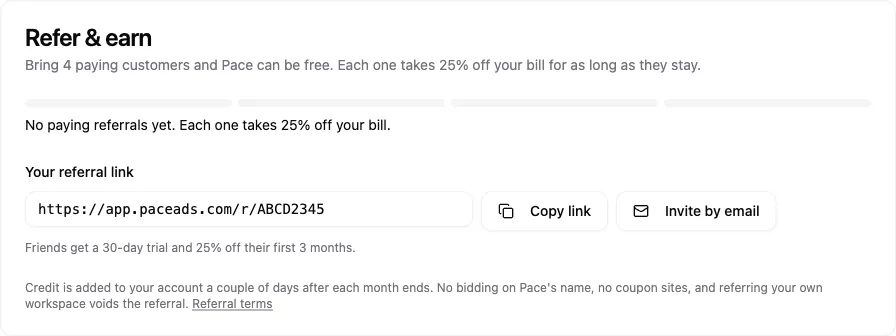
Permissions required: Only the workspace owner sees the Refer & earn card. Referrals are open to Basic, Pro, One and Enterprise workspaces.
What your friend gets
The team you refer gets:
- A 30-day free trial instead of the usual 14 days. Like every Pace trial, it starts with a card on file, and nothing is charged until the trial ends.
- 25% off each of their first 3 paid months. On a yearly plan, that works out to 6.25% off their first year.
They get this by signing up through your link. Or they can type your code into the Have a referral code? field on the plan step, any time before they add their card. Use Copy link to share it anywhere, or Invite by email to open a ready-written email.

What you earn
- Each paying referral takes up to 25% off your bill. It's never more than that team paid Pace that month.
- Four paying referrals can cover your plan in full. Each referral's credit is capped at what that team paid, so four teams on smaller plans might not cover all of it.
- From the fifth on, each one earns you 25% of what that team pays, in cash, every month they stay. In any month your plan is fully covered, the card shows a Pace Partner badge.
On Enterprise, each paying referral earns you 25% of what that team pays, as credit on your bill. Past four, each extra team earns you 25% in cash, the same as on other plans.
Your first four paying referrals, oldest first, are the ones that count toward your bill. You only earn for months you've paid for yourself.
Once you've earned cash, three tiles appear on the card: Saved in the last month, Cash this month and Next payout. Only the person who created the referral link sees the cash tiles, even if the workspace changes owner. Pace pays cash by hand once a month. Cash for a month can be paid 30 days after that month ends, and payout day is the 15th.
How the credit reaches your bill
A couple of days after each month ends, Pace works out what you earned and adds it to your account as credit. Stripe takes it off your next invoice automatically. On a yearly plan, credit builds up and comes off your renewal.
You'll see it in three places on the Billing tab:
- The Refer & earn card shows your Credit on account.
- The Subscription card shows your discounted price, your list price struck through, and an X% off from referrals pill.
- Each invoice that used credit says with N referral credits under the amount.
Credit can't be cashed out. If you cancel, it stays on your account in case you come back.
Tracking your referrals
The card lists each referral as Referral 1, Referral 2 and so on. You never see the other team's name or email. Each row shows a status:
- Signed up: they've created a workspace.
- On trial: they're in their free trial.
- Paying: they've paid a real invoice and count toward your reward.
- Ended: they've stopped paying.
When a referral's payments change
A referral earns you nothing until the team has paid a real invoice. After that:
- They cancel. The referral stops counting from the first month they don't pay. It counts again if they come back.
- They change plans. Your share moves with what they pay.
- A payment is refunded or disputed. That payment stops counting. Credit you've already had stays yours. Cash not yet paid for it is cancelled, and cash already paid is taken off your future cash.
- They move to Enterprise. The referral stops counting.
Who can refer and what counts
- Enterprise workspaces can refer once they're on a paid plan. The teams you refer need to be on Basic, Pro or One to count.
- Founder workspaces can't refer or earn.
- There's one level only. Teams your referrals bring in don't earn you anything.
- If someone clicks more than one referral link, the first link they click counts for 90 days.
- The referral discount can't be combined with other Pace offers.
Referral terms
- Don't bid on Pace's brand name in search ads.
- Don't post your link or code on coupon or deal sites.
- Don't refer your own workspace or a teammate's. Self-referrals are voided.
- Pace may disable a referral code and void its open referrals.
Pace only asks you to refer by email to the workspace owner and inside the app. It never asks in Slack. Agencies can add a Paced by Pace link to client reports from the report branding settings. It's off unless you turn it on.
Questions about a referral or a payout? Email [email protected].