Most Pace settings save as soon as you change them, so there's no Save button to look for. Changes that reach your ad platform, or are hard to take back, wait until you press Apply.
This applies to account, portfolio and campaign group settings, plus Google Ads campaign and Meta Ads campaign or ad set settings.
Find a setting
Each window has a menu down the left with a Search settings box at the top. Type a word like "rollover" and the menu narrows to the matching section, with the setting highlighted. Money fields show the account's own currency, for example A$ for Australian dollars.
In account settings, the Budget and pacing section has a small chart of this month's projected spend, marked On pace, Under or Over. It redraws as you type a budget, before anything saves. It isn't shown for accounts on Daily floor or during a running custom flight.
Why it works this way
- Closing the window early never loses an edit, and every auto-save comes with an undo.
- Changes to live campaigns on the ad platform wait until you've checked them.
Saves on its own or waits for Apply
| Window | Waits for Apply | Everything else |
|---|---|---|
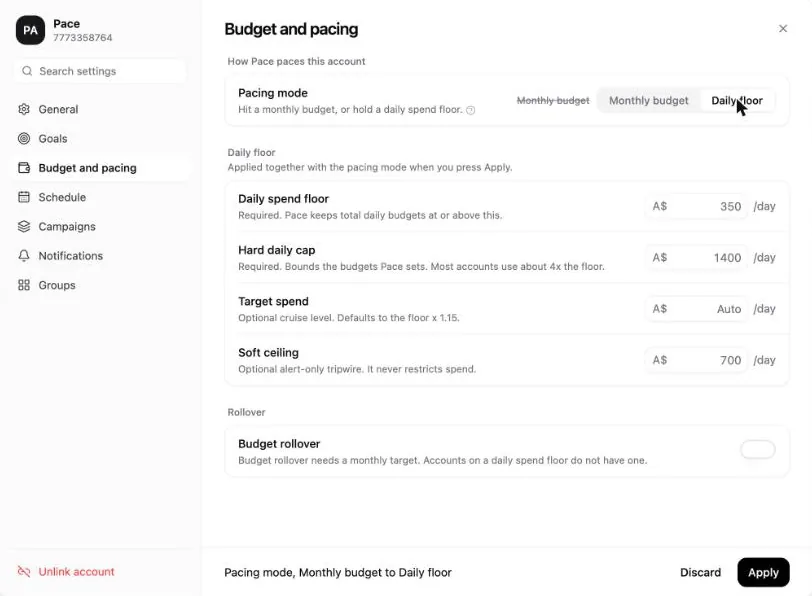
| Account | Pacing mode and the Daily floor numbers | Saves on its own |
| Campaign group | Adding or removing campaigns, and a monthly budget moving to or from $0 | Saves on its own |
| Portfolio | Adding or removing accounts, budget shifting settings and conversion values | Saves on its own |
| Google Ads or Meta Ads campaign | Every section (in Pace rules the button reads Save) | Nothing |
How auto-save works
Typed text saves about a second after you stop typing, or straight away when you click out of the field or close the window. Money fields (budgets, month overrides, custom flights and the month-end amount) save only when you press Enter, click out of the field or close the window. Switches, dropdowns and pickers save immediately.
The footer shows Saving… and then Saved. In account settings it reads Saved. Changes apply on the next pacing run. A failed save shows Couldn't save. with a Retry link.
Saving never starts a pacing run or changes anything on your ad platform. Pace uses the new value on its next pacing run.
Because money waits for Enter or a click out, a half-typed amount can't replace your budget while you pause. A blank or unreadable amount never saves, and closing the window with an account budget of $0 still waiting asks you first.
Undo a change
Each save shows a toast named after the change, such as "Monthly budget updated", with an Undo button that stays for 10 seconds.
While the window is open, the footer Undo button steps back one save per press, up to the last 20. Hover it to see what it undoes.
Every auto-saved change also appears in your change history as Settings changed, with who made it and a before and after line for each field.
How Apply works
The footer lists each staged change as "Setting, old to new", and the old value appears struck through next to the control. Press Apply to confirm it, or Discard to drop it. Campaign windows label the button Apply to Google Ads or Apply to Meta. ⌘S or Ctrl+S applies the open section.
In a campaign window, a failed apply shows Couldn't apply in the footer with the reason, and your edit stays staged. Close the window with staged edits and Pace asks Discard unsaved changes? first.
Limitations
- Create portfolio and Create campaign group don't auto-save. Nothing exists until you press Create portfolio or Create group.
- Turning budget rollover on saves straight away and isn't on the Undo list.
- Turning budget rollover off drops this month's carry, so Pace asks first. It also asks before a change that would turn rollover off: excluding the account from pacing, a custom flight that has started, or applying Daily floor. Cancel leaves the setting as it was, and a confirmed change isn't on the Undo list.
- If a teammate changed the same setting after you opened the window, Pace won't save over it. The footer shows Changed elsewhere, not saved. and reloads the current value.
Permissions required: Any workspace member can edit settings. Portfolios and campaign groups need the Pro plan or above.
Next
Read Set your monthly budget to put these settings to work.