You can edit a Meta Ads campaign and every ad set inside it from a single dialog in Pace, without opening Ads Manager.
Open the editor
- Open the account and find the campaign in the campaign table.
- Hover the campaign row and click the gear icon on the right.
- Choose Edit.
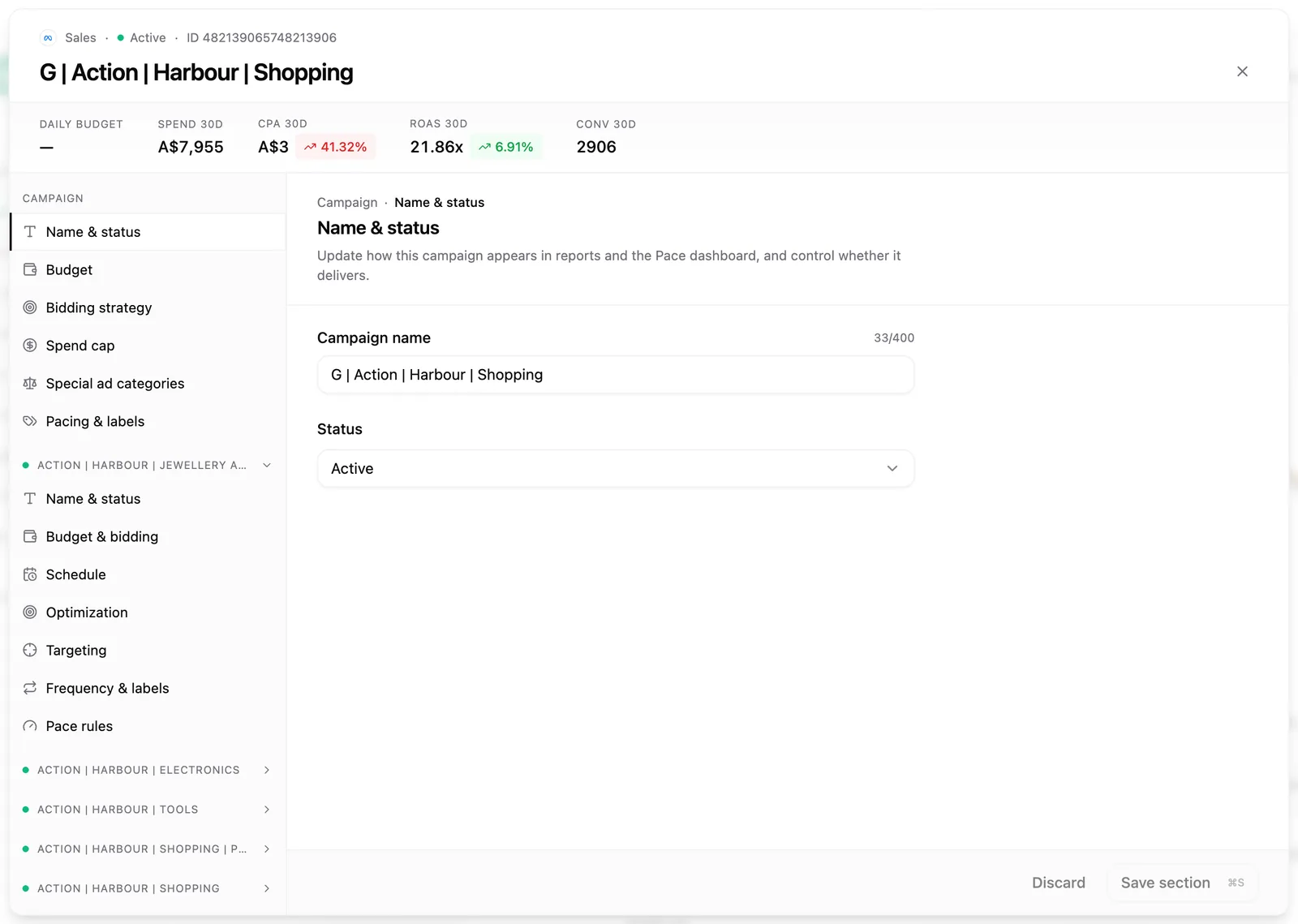
The dialog opens with a stats strip across the top (daily budget, spend, CPA and ROAS for the last 30 days, in the account's billing currency) and a left-rail nav listing every section.
The two levels
Campaign sections sit at the top of the nav: Name & status, Budget, Bidding strategy, Spend cap, Special ad categories and Pacing & labels.
Below them, each ad set in the campaign gets its own collapsible group with seven sections: Name & status, Budget & bidding, Schedule, Optimization, Targeting, Frequency & labels and Pace rules.
Ad-level creative editing isn't included; the dialog stops at the ad set.
Budgets follow CBO or ABO
Pace reads the campaign's budget mode and puts the budget control at the right level:
- Campaign budget (CBO): edit the budget in the campaign's Budget section. Ad sets show a read-only note.
- Ad set budgets (ABO): the campaign's Budget section tells you the budget lives below, and you edit each ad set's amount in its Budget & bidding section.
You can change the amount, but not the type. Pace won't switch a campaign between daily and lifetime budgets or between CBO and ABO, because those switches disrupt Meta's delivery learning.
Edit targeting
The Targeting section on each ad set covers locations and excluded locations, age and gender, detailed targeting, custom and lookalike audiences, and placements. Search-and-add pickers run against Meta's own targeting search, so you can add new interests, geos and audiences as well as remove them. Pace leaves anything it doesn't model untouched when you save.
Set pace rules per ad set
The Pace rules section gives Pace three optional controls for that ad set: a Minimum daily budget, a Maximum daily budget and an Efficiency target (CPA or ROAS) that overrides the account goal. Meta's own per-ad-set minimum is $1.56 a day.
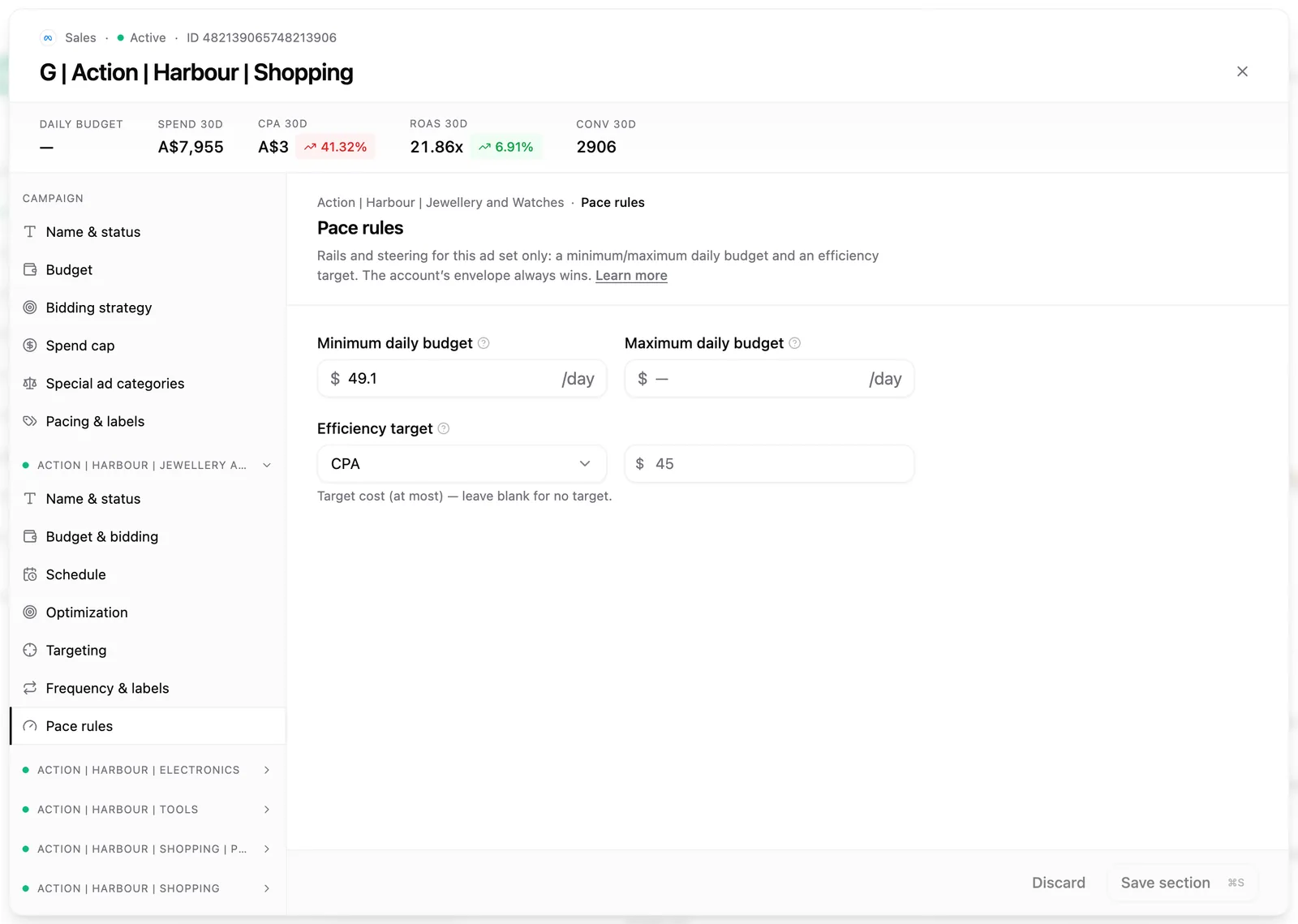
These rules need ad set budget management, which is a Pro plan feature. Turn on Manage ad set budgets (ABO campaigns) in the account's General settings. You can save the rules before then; they take effect once it's on. For how the rules feed the optimiser, see budget pacing across platforms.
Save as you go
Each section saves on its own. The Save button sits in the footer and enables the moment you change something; ⌘S or Ctrl+S does the same. Saving keeps the dialog open, so you can move through several sections in one sitting. An amber dot marks a section with unsaved work, a green check confirms a save, and closing with unsaved changes asks you to confirm first.
Every save is written to the account's change history.
If a save is blocked: Pace guards the edits Meta restricts rather than letting them fail, such as bid-strategy changes on a campaign budget with 70 or more ad sets. If an ad set changed in Meta while you had the editor open, Pace stops the save instead of overwriting; reload the ad set and re-apply your edits.