A portfolio bundles several ad accounts into one client, so you see their spend, pace and goals blended together instead of account by account. Agencies use one portfolio per client; multi-brand teams use one per brand or region.
Permissions required: Portfolios are available on the Pro plan and above. On lower plans the page is visible but locked.
Create a portfolio
- Open Portfolios from the main navigation.
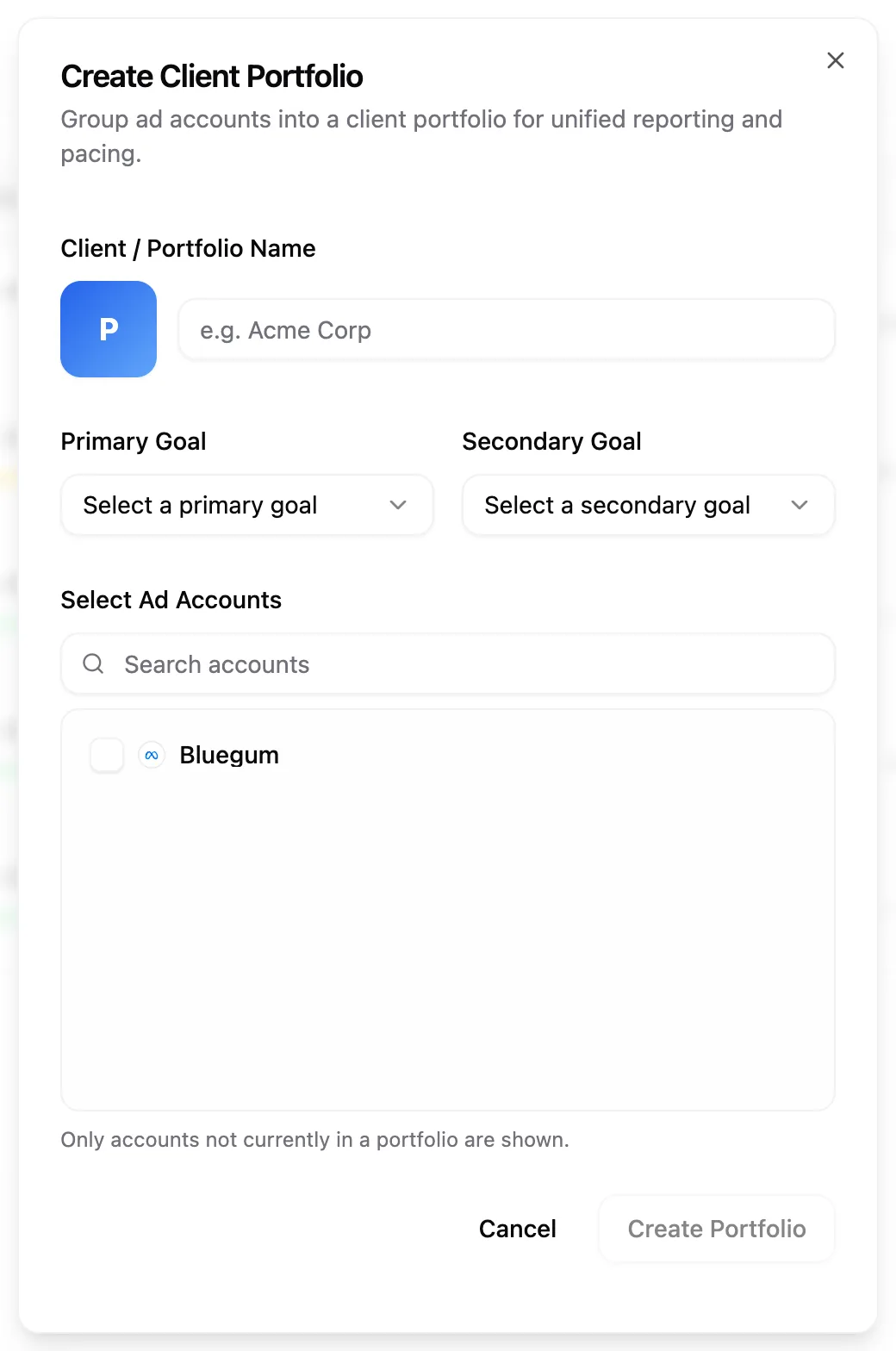
- Click Create Portfolio. If you already have portfolios, the button reads Create another portfolio.
- Enter a name under Client / Portfolio Name. Click the avatar next to it to pick the portfolio's colour, which it wears on its avatar and trend lines.
- Choose a Primary Goal, and a Secondary Goal if you want a second badge tracked. Once you've ticked accounts below, Pace suggests a primary goal based on what they already track, with the reason shown underneath — pick your own to override it.
- Under Select Ad Accounts, search by account name or platform and tick every account this client owns. As you type the client's name above, Pace ticks the accounts whose names match it and marks them Suggested, with last month's spend shown beside each one so you can check before committing. Tick or untick anything yourself and your choices take over for the rest of this dialog. Accounts from different platforms can sit in the same portfolio.
- Click Create Portfolio.
A new portfolio starts in the currency most of its accounts use, and you can change it later in Portfolio Settings. If the accounts you pick bill in different currencies, Pace shows a Mixed Currencies Detected notice and blends the totals in the portfolio's currency, converting each account at the daily ECB reference rate. Converted totals show ≈; hover it to see the rate date. Each account's own rows stay in its billing currency. See how Pace handles currencies for details.
What you'll see
Each portfolio has a row on the Portfolios table with its name, the platforms inside it, month-to-date spend against the blended budget, totals for Yesterday, Daily and Remaining, a blended pace pill, and its goal badges. Expand a row to see the member accounts underneath with the same columns as the accounts page.
The Yesterday, Daily and Remaining totals add up what each member account shows in those columns, converted into the portfolio's currency. An account showing a dash adds nothing: one awaiting its first flight run, say, or Remaining on a Daily Floor account. When a Daily Floor account's floor is part of the Daily total, it starts with ≥, because the floor is a minimum. On Last Month, Yesterday is left blank, Daily is the average daily spend across last month's active days, and Remaining is last month's budget minus what was spent.
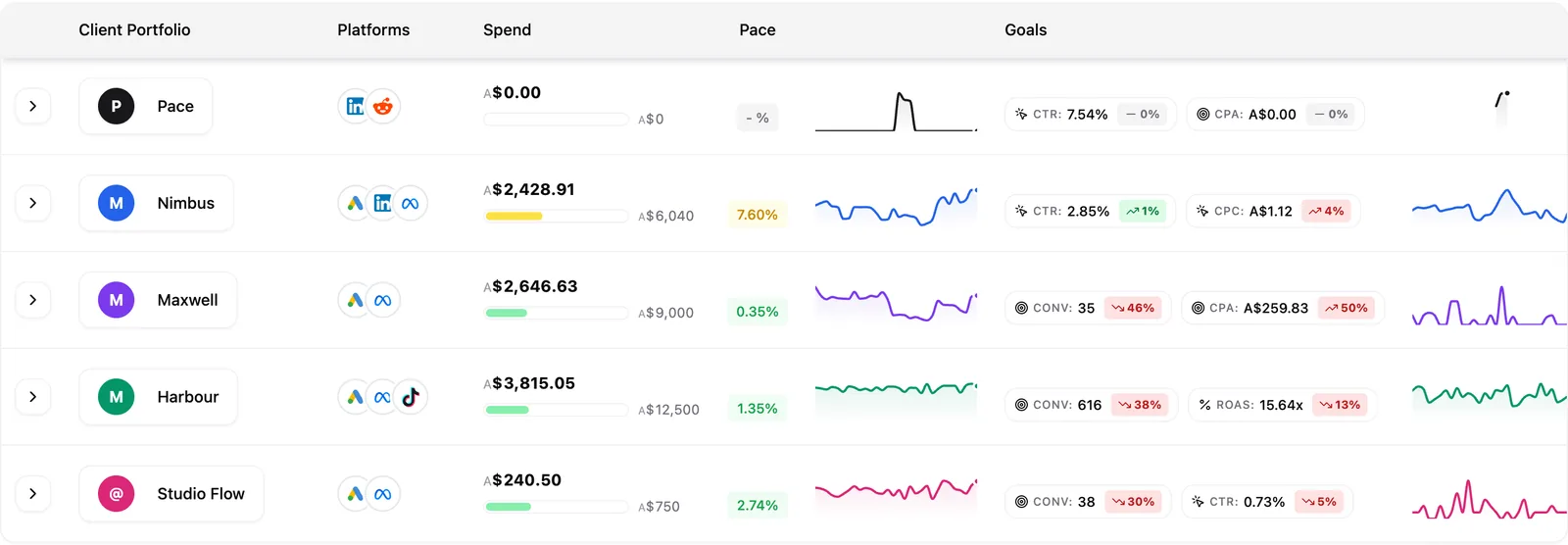
Rows also have two 30-day trend lines: daily spend summed across the members, and the portfolio's primary goal blended day by day. Both are in the portfolio's currency, converted the same way as the totals. Hover any point for that day's figure.
Use the toolbar above the table to switch between This Month and Last Month, hide the Spend, Pace or Goal columns, and sort by spend, pace or name. Sorting by spend compares portfolios in your workspace's display currency, so portfolios in different currencies rank fairly. Your choices stick across reloads.
Open the portfolio dashboard
Click a portfolio name to open its own workspace. Seven tabs run down the side: Overview, Performance, Reports, Findings, Changes, Records and Notes. Overview works like an account's Overview tab. Four blended metric boxes sit across the top, each with a small daily trend line and the dates it covers. Below them, every member account is listed with its own spend, pace and goal, so you can spot which account is dragging the rollup. Cards for Findings, Recent changes, Reports and Notes follow.
If some accounts are slow to load, the metric boxes say how many have come in, for example "6 of 9 accounts so far", so you know the totals aren't final yet. Changing the dates or a background refresh updates the figures in place. If a filter you set on the Accounts page (platform, search or My accounts) hides some of the portfolio's accounts, a line above the table says so. Click Clear to remove those filters, which clears them on the Accounts page too.
The portfolio's Findings tab works like an account's, covering every account in the portfolio. An Account column shows where each finding came from, and you can review and apply fixes from there. See how Findings work.
The portfolio toolbar mirrors the account one: month-to-date spend, yesterday's spend, the summed daily target, goal badges, and a Pace button. Beside the spend figure, a line shows what's spent, out of what, and where the portfolio is on track to land by month end — see how portfolio pace is worked out below. That line only shows on wider screens; it's hidden on a narrow browser window or a smaller laptop to keep the toolbar from crowding. Pace runs pacing for every account in the portfolio individually, against that account's own monthly target.
The Performance tab uses the same date picker as your accounts, and they share one range: pick Last 30 days on an account and the portfolio shows Last 30 days too. Comparison stays on across visits, and the refresh icon in the picker pulls the latest figures for every account in the portfolio. The chart at the top blends every account's daily figures, and with a comparison on it adds the previous period as dashed lines. See how to read the performance chart.
Some platforms only report a limited stretch of history. X, for example, goes back 90 days. If a portfolio includes an account like that, the whole portfolio uses the shortest limit: longer presets are greyed out, and a longer range you picked on another account shows as the longest one that fits, such as Last 90 days. Your choice on other accounts stays as it was.
For a single PDF covering the whole client, build one from the Reports tab. See how client reports work.
Change or remove a portfolio
Hover a portfolio row and click the settings cog, or click the cog in the portfolio's own toolbar, to open Portfolio Settings. It has three tabs: General, Accounts and Budget.
General covers the portfolio's name, colour, goals and currency, plus where its alerts are sent. Click + Secondary to add a second goal badge, or set it to None to drop it. The currency list shows the currencies your portfolio's accounts use first, then every other currency — type to search. Delete Portfolio sits by itself at the bottom of this tab: click it, then confirm, to remove the portfolio. Only the portfolio itself is removed — its ad accounts stay in Pace with their budgets and settings untouched, just unassigned, so you can add them to another portfolio. If you deleted from the portfolio's own page, Pace takes you back to Portfolios.
Accounts is where you add or remove the accounts inside this portfolio. It lists this portfolio's accounts plus any account that isn't in another portfolio yet. An account can only belong to one portfolio at a time.
Budget lists each member account's budget for the current month, read-only, with a cog beside each one that jumps straight to that account's own budget settings, and a total. An account running a custom flight shows its current flight budget with the flight dates underneath, and that figure counts toward the total. Each account still paces to its own budget; nothing on this tab changes pacing.
How portfolio pace is worked out
Portfolio pace weighs each member account by the budget it carries, so a $50,000 account moves the number more than a $500 one does, and it's measured against the sum of the members' own budgets. It's the same figure on the Portfolios table and on the portfolio's own page, so the two never disagree. Hover the pace pill any time to see exactly what it's measured against.
A handful of accounts never count toward the figure, on either the spend or the budget side: accounts on Daily Floor pacing, accounts running a custom flight instead of the calendar month, accounts whose spend hasn't loaded into Pace yet, and accounts billing in a currency Pace can't convert. The pill's tooltip names any of these it left out.
If the pace pill shows a dash
A dash means Pace doesn't have a fair number to show yet. Hover the pill — it always explains why. The usual reason: no member account has a usable budget, or every budgeted account is one of the ones Pace leaves out (Daily Floor, a custom flight, spend not yet loaded, or no exchange rate — see above). Set a monthly budget on an account Pace doesn't otherwise leave out, and the pace pill fills in on the next refresh.
Portfolio alerts
Pace can alert you when a whole client is off pace, not just when one of its accounts is. This looks at the portfolio's overall pace — the same figure the pace pill shows — so it catches a client that's drifting even when no single account has crossed its own alert threshold.
What fires it. The portfolio running noticeably behind or ahead of its summed account budgets fires an alert, at the same warning/serious/critical levels as account pacing alerts. It stays quiet for the first few days and the last couple of days of the month, when the numbers are too thin to mean much.
When it stays quiet. If one account is clearly behind the whole thing and that account has already sent its own pacing alert this month, Pace holds the portfolio alert back rather than telling you the same thing twice. If that account's own alert stops applying — it's muted, or catches up — Pace sends the portfolio alert on its own.
Not monitored. An eye icon next to the pace pill, with a plain-English reason on hover, means Pace can't judge the portfolio fairly right now — usually a member account's spend hasn't loaded yet or is missing an exchange rate. No new alert fires while a portfolio shows this, though a bell from earlier in the month can still be sitting there next to it — the eye and the bell aren't mutually exclusive. The bell is coloured by how serious the alert was; hover it for the message and when it was sent. When Pace held an alert back instead of sending it, the bell shows grey with "Held." If the portfolio's alerts are muted, both icons are replaced by a single crossed-out bell.
Turning it on or off. Open Portfolio Settings → General → Notifications to mute a portfolio's alerts, or to set where they go (its own Slack channel and email recipients, separate from the workspace defaults). The alert type itself lives in Settings → Alerts as Portfolio pace, on the Pro plan and above; until you change it, it follows whatever your Pacing Alert setting is.