Every account and every campaign group has a What Pace does setting with three choices: Pace and protect, Protect only and Off. Choose how much control Pace gets.
On an account, find it under Account Settings, in the Campaigns section. On a group, it's in the Campaigns section of the group's settings.
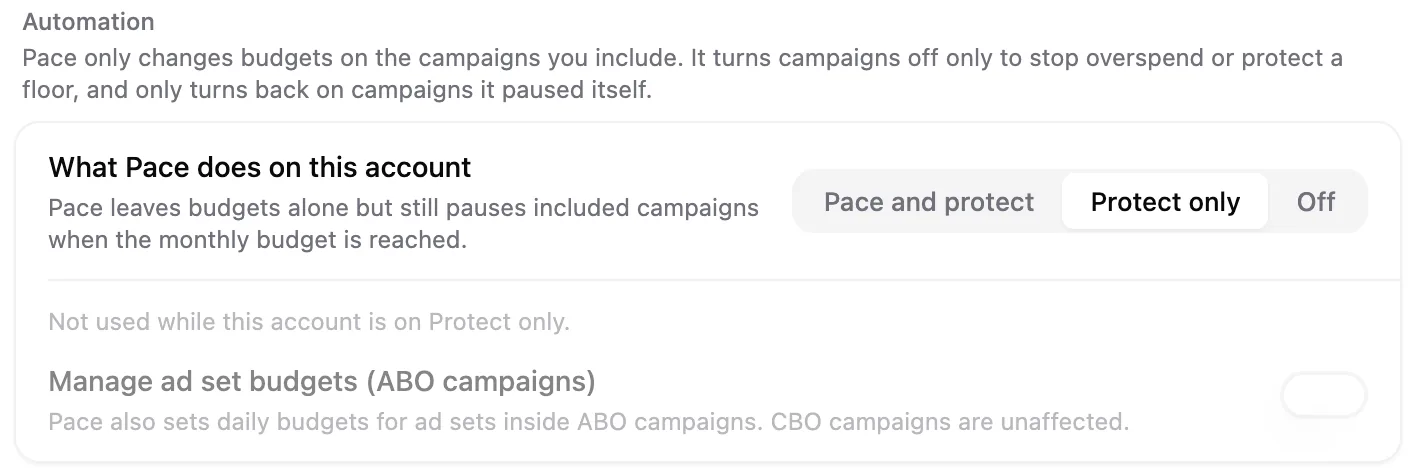
The three choices
| Pace and protect | Protect only | Off | |
|---|---|---|---|
| Pace paces the account's budgets | Yes | No | No |
| The account pauses at its monthly budget | Uses your month-end setting | Always | No |
| Pace resumes campaigns on the 1st | Yes | Yes | Yes |
The table is about the account itself. Groups on an Off account keep their own month-end setting, so they can still pause at their budgets.
- Pace and protect is the default. Pace paces your budgets across the month and applies your At month end choice when the monthly budget is reached.
- Protect only stops Pace changing your budgets. Pace still watches spend, and when the account or group uses its monthly budget it pauses the included campaigns. It resumes them on the 1st, or sooner if you raise the budget.
- Off means Pace doesn't pace the account. For a group, Pace doesn't change the group's budgets or pause it at its budget.
When to use Protect only
Use it when you set budgets yourself, or another tool does, and you still want a hard stop at the monthly limit. Pace won't move your daily budgets. It only stops campaigns once the month's money is spent.
Protect only always pauses. The Keep running choice is hidden while it's selected, and it comes back, with your earlier answer intact, when you switch back to Pace and protect.
If Pace is holding campaigns at a small daily amount when you switch, set the budgets you want afterwards. Protect only won't change them back for you.
Campaigns outside groups stop when they use the budget left after groups.
An account on Protect only still needs a monthly budget for the month. Without one, there's nothing to protect and Pace does nothing.
What Protect only keeps and drops
Keeps: the pause at the monthly budget, the pause when a group reaches its own budget, and the $0 stop. A group with a $0 month, or an account whose rollover leaves nothing for the month, has its included campaigns paused, then resumed when the month gets a budget or on the 1st.
Drops: budget changes from pacing, goals and the settings that only steer pacing, and budget rollover. Switching to Protect only from Pace and protect asks you to confirm that rollover turns off.
Groups and accounts together
- A group on a Protect only account is paused at its budget too, and Pace doesn't change its budgets.
- A group on an Off account keeps its own month-end setting. Pace doesn't pace the account, but a group can still stop at its budget.
- Protect only can't be chosen for a group on an Off account. Switch the account first.
- A group set to Off on any other account isn't paused at its budget. A $0 month still pauses it, unless the account is Off.
Limits
- Protect only isn't available on Daily floor accounts. A floor account has its own daily spend cap instead of a monthly stop.
- You can't run Pace Now on an account or group that's on Protect only or Off.
- Accounts and groups you had excluded from automation before this setting existed are now Off, with nothing else changed.
In the accounts table and grid, a shield beside an account's name marks Protect only, and a pause icon marks Off. Hover either to see what it means.