Open your Google Ads hourly report and look at 3am. If your campaigns are spending steadily there with zero conversions, you have already met the problem dayparting solves. Most advertisers set campaigns to run 24/7 by default, then never revisit the decision. The result: budget burned in hours when nobody is converting, less money in the hours that actually move the needle.
Dayparting is the fix. It is one of the oldest ideas in advertising, borrowed straight from television, and it remains one of the most underused levers in paid search. This guide covers what dayparting means, how to set it up in Google Ads and other platforms, the strategies that work for different business types, and the mistakes that quietly turn a smart scheduling decision into a performance problem.
What is dayparting?
The dayparting meaning is straightforward: divide the day into parts, treat each part differently. The term comes from broadcast television, where networks split the day into segments (morning, daytime, prime time, late night) and sold advertising slots at different rates depending on viewership. A prime-time ad cost more than a 2am slot because more people were watching.
Digital ads work on the same principle, with far more precision. Instead of broad time blocks, you can target specific hours of specific days. The dayparting definition in a paid search context is the practice of adjusting bids, budgets, or delivery based on the time of day and day of the week. You might bid 30% higher during your peak conversion hours, cut bids by 50% overnight, or pause ads entirely on weekends if your business is closed.
The thing television dayparting never had is data. Networks worked off broad audience estimates. Google Ads gives you hourly conversion data, cost per acquisition by time of day, and return on ad spend broken down by day of the week. You can see exactly when your money produces results, and when it does not.
How dayparting works in Google Ads
Google Ads handles dayparting through the ad schedule feature, set at the campaign level. By default, every campaign runs ads 24 hours a day, seven days a week. When you create an ad schedule, you define the time blocks your ads are eligible to show in, and optionally apply bid adjustments to each block.
Setting up an ad schedule. Open a campaign, select "Ad schedule" from the left menu, and click the pencil icon to add time blocks. Schedules go down to 15-minute increments, which is more precision than most accounts will ever need. A typical schedule might run ads from 6am to 10pm on weekdays and 8am to 6pm on weekends.
Bid adjustments. The real power of daypart targeting in Google Ads sits in bid adjustments. For each time block, you can set a bid adjustment from -90% (nearly eliminating bids) to +900% (multiplying bids by 10x). A -50% adjustment during late-night hours halves your bids and pulls back how hard your ads compete. A +20% adjustment during peak business hours pushes them harder so you win the top positions when it actually matters.
Time zones, the silent saboteur. Ad schedules run on the account-level time zone, not the campaign level. If your account is set to Eastern Time but your audience is in Pacific Time, your 9am-5pm schedule is actually running 6am-2pm for the West Coast. For national or international campaigns, this mismatch quietly undermines whatever scheduling logic you thought you were applying. If time zone alignment matters, you usually need separate campaigns per region with matching time zone settings.
How the schedule interacts with daily budgets. This is where dayparting creates a subtle budget problem. Google's daily budget system assumes campaigns run all day. When you restrict ads to a 12-hour window, Google still tries to spend the full daily budget inside that compressed window. The fallout: faster budget exhaustion, higher CPCs during your active hours, and the occasional overspend day when Google front-loads delivery. Understanding this interaction is essential for accurate budget pacing.
Smart Bidding and ad schedules. If you are running Smart Bidding strategies like Target CPA or Target ROAS, manual bid adjustments on the ad schedule are ignored. Google's machine learning already weights time of day as one of dozens of auction-time signals. You can still use the schedule itself to exclude hours entirely. Setting a -100% bid adjustment or simply leaving those hours off the schedule will keep ads from running. That is useful when you do not want leads outside operating hours, regardless of what the algorithm thinks.
Daypart targeting strategies
The right dayparting strategy depends on your business, your audience, and your data. Here is what tends to work for different scenarios.
B2B: weekday business hours. For B2B advertisers chasing decision-makers at their desks, the classic 9am to 5pm weekday schedule is a sensible starting point. Most B2B conversions (demo requests, consultation bookings, whitepaper downloads) happen during working hours. Weekend traffic on B2B keywords leans research-y, with lower conversion rates and higher CPA. Start with business hours, then let your data expand or contract from there. Some B2B verticals show a lunch-hour spike around 12pm-1pm as buyers browse on breaks, and a 4pm-5pm push when people wrap up tasks.
B2C: evenings and weekends. Consumer purchases often peak outside business hours. Retail, entertainment, travel, and subscription services frequently see their strongest conversion rates between 7pm and 10pm on weekdays, when people are home on personal devices. Weekend performance varies by vertical. Travel and experiences tend to do well on Sundays as people plan the week ahead. Fashion and electronics often peak on Saturday afternoons. Your data will tell you the specific pattern.
Ecommerce: follow the money. Ecommerce dayparting should follow conversion value, not assumptions. Pull your hourly conversion report for the last 30 days and look at value by hour, not just conversion count. Late-night buyers may convert less often but spend more per order, which changes the calculus entirely. For ecommerce, ROAS-based dayparting (adjusting bids to maintain target return) is generally more useful than CPA-based scheduling.
Local services: match operating hours. If you run a plumber, a dental practice, or a law firm, there is no upside in generating phone calls at midnight when nobody can answer. For local services with phone-call conversions, restrict your schedule to hours when staff are actually available. Missed calls from paid traffic are wasted spend, with no recovery path. Some local businesses stretch the schedule slightly past operating hours to catch after-hours form submissions, but bid down hard during those windows.
Data-driven approach: use the hourly report. Whatever the business type, the most reliable dayparting strategy is data-driven. In Google Ads, go to Reports and build a custom report showing hour of day and day of week against your key metrics: conversions, CPA, conversion value, and ROAS. Look for patterns across at least two to four weeks of data. Find the hours with the lowest CPA and highest conversion volume and bid up. Find the hours with the highest CPA or zero conversions and bid down or exclude them. The goal is to let actual performance data drive the schedule rather than your gut.
Dayparting across platforms
Ad scheduling capabilities differ a lot across platforms, which matters as soon as you are managing cross-platform campaigns.
Google Ads has the most granular dayparting controls of any major platform. Hourly scheduling in 15-minute increments, bid adjustments from -90% to +900%, day-of-week targeting. The hourly performance report gives you the data foundation to actually make informed scheduling decisions. This is the platform where dayparting delivers the most measurable impact.
Microsoft Ads mirrors Google's ad scheduling functionality closely. You can set time-based bid adjustments by day and hour, and the interface is nearly identical. If you have a dayparting strategy working in Google Ads, you can usually copy it across to Microsoft Ads. The main difference is volume. Microsoft's smaller audience means you need a longer window to gather statistically significant hourly data before making changes.
Meta Ads offers ad scheduling at the ad set level, but with real limitations. You can schedule ads to run only during specific hours, but the feature requires lifetime budgets, not daily budgets. Switching to lifetime budgets changes how Meta's algorithm paces spend, which can disrupt performance on campaigns that were optimised under daily budgets. There are no hourly bid adjustments. For most Meta advertisers, the algorithm's built-in time-of-day optimisation is more effective than manual scheduling. If you do need to restrict delivery hours on Meta, switch to the ad set schedule with a lifetime budget and accept that pacing behaviour will look different from daily-budget campaigns.
LinkedIn Ads has no native dayparting. You cannot schedule ads to specific hours or apply time-based bid adjustments. LinkedIn's delivery algorithm paces across the day on its own. For B2B advertisers who want to limit LinkedIn spend to business hours, the only workaround is manually pausing and enabling campaigns, which is not realistic at scale. Worth considering when allocating budget across platforms.
Cross-platform budget impact. When you daypart on some platforms but not others, your overall budget distribution shifts. If Google campaigns run 12 hours a day and Meta campaigns run 24 hours, Meta will eat a disproportionate share of total ad spend simply because it has more hours to spend in. Cross-platform pacing tools need to account for these schedule differences when calculating daily budget targets and projecting monthly spend.
Dayparting and budget pacing
Ad scheduling has a direct and consistently underestimated impact on budget pacing. As soon as your campaigns stop running 24/7, your daily budget does not distribute evenly across the month, and the pacing math gets messier.
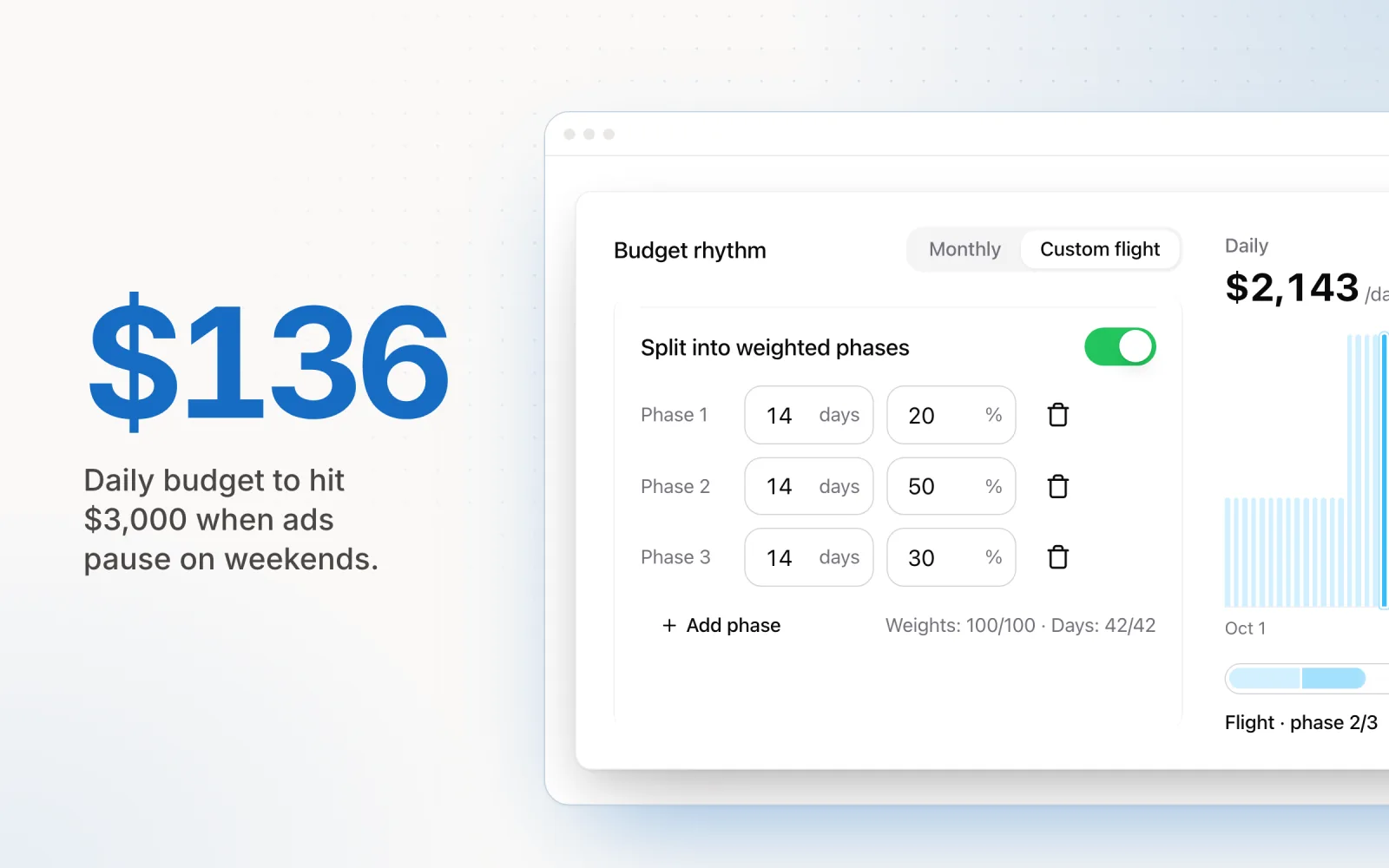
Take a campaign with a $3,000 monthly budget and a $100 daily budget. If it runs all day every day, the math is trivial: $100 per day for 30 days. Add a dayparting schedule that pauses ads on weekends, and you have roughly 22 active days instead of 30. To still hit $3,000, your daily budget needs to be around $136 on active days. If your pacing tool ignores the schedule and quietly leaves the daily at $100, you will underspend by about 27% for the month and never see why.
Hourly restrictions create the same problem. A campaign running 8am to 8pm has 12 hours to spend its daily budget. Google compresses delivery into that window, but the actual results vary. Strong-demand days overspend. Soft-demand days underspend. Over a month, these fluctuations compound into pacing drift that is hard to correct without daily monitoring.
Pace's pacing engine accounts for this. The weekday and weekend toggles mean pacing calculations only count active days when projecting budget targets. If you disable weekends, Pace divides the remaining budget across the remaining weekdays, not the remaining calendar days. That prevents the systematic underspend that hits pacing tools that treat every day the same regardless of schedule.
Common dayparting mistakes
Dayparting is conceptually simple. It is also easy to mess up. The same mistakes turn up across accounts of all sizes.
Not enough data. The most common error is making scheduling decisions on too little data. One week of hourly data is not enough to spot a reliable pattern. A single high-CPA Tuesday afternoon could be variance, not a signal. You need at least two to four weeks of consistent data before drawing conclusions. Low-volume accounts with fewer than 50 conversions per month may need six to eight weeks. Cutting hours on insufficient data is worse than running 24/7, because you are restricting reach based on noise.
Over-restricting hours. Aggressive dayparting can backfire by starving the campaign of conversions. If you cut your schedule to a six-hour window because those are your absolute best hours, you have just eliminated every conversion that would have come from the other 18. Some of those hours have a higher CPA than your peak. They may still be profitable. The right move is usually bid adjustments rather than exclusions. Bid down during weaker hours instead of cutting them entirely. Only exclude hours that consistently produce zero conversions on meaningful spend.
Timezone confusion. Ad schedules run on the account's time zone, not the user's. Agencies managing accounts across multiple time zones regularly misconfigure schedules because they set them in their own local time, not the account's configured time zone. Always verify the account time zone before creating a schedule, and document which time zone each schedule is based on.
Ignoring mobile behaviour. Users research on mobile during commutes (7am-9am, 5pm-7pm) and convert on desktop later that evening or the next day. Cut bids during commute hours because the direct conversion data looks weak, and you may have eliminated the top of a conversion path that finishes later. Google Ads cross-device conversion data can show this, but most advertisers ignore it when making dayparting calls. Before reducing bids during a time period, check whether it contributes to assisted conversions even when direct conversions are low.
Leaving cross-device conversions out. Related to mobile behaviour. Cross-device conversions are routinely excluded from standard hourly reports. A user who clicks your ad on their phone at lunch and converts on their laptop that evening may not show up in your hourly data for the lunch hour. If your cross-device volume is meaningful (check the "Conversions" column settings to include cross-device), the hourly data without it is misleading. Factor it in before adjusting the schedule.
Set-and-forget scheduling. Conversion patterns change. Seasonal shifts, new competitors, audience behaviour evolution, and one-off anomalies (public holidays, events) move the best hours around. A schedule set six months ago on summer data may be wrong for winter. Review hourly performance data quarterly at minimum and adjust the schedule to current patterns, not historical ones.
Frequently asked questions about dayparting
What is dayparting?
Dayparting is the practice of dividing the day into segments and adjusting your advertising activity for each segment. In digital advertising, it means scheduling your ads to run only during specific hours or days of the week, or adjusting bids up or down during certain time periods to maximise performance and budget efficiency.
What is dayparting in Google Ads?
In Google Ads, dayparting is implemented through the ad schedule feature. You can set specific hours and days when your ads are eligible to show, and apply bid adjustments ranging from -90% to +900% for each time block. This lets you bid more aggressively during high-converting hours and reduce spend during low-performing periods.
Should I use dayparting with Smart Bidding?
If you are using Smart Bidding strategies like Target CPA or Target ROAS, manual bid adjustments for ad schedules are ignored because the algorithm already factors in time of day as one of its auction-time signals. However, you can still use ad scheduling to completely pause ads during hours when you do not want to run at all, such as outside business hours for a service business. Only use bid adjustments with manual CPC or enhanced CPC strategies.
What are the best hours to run Google Ads?
There is no universal best time. The optimal hours depend entirely on your industry, audience, and conversion data. B2B advertisers typically see peak performance during weekday business hours (9am to 5pm), while B2C and ecommerce advertisers often perform well during evenings and weekends. The only reliable way to determine your best hours is to run ads across all hours for two to four weeks, then analyse the hourly performance data in Google Ads to identify when your conversions and CPA are strongest.
Dayparting is one lever among several. It works best alongside the right bidding strategy, sensible budget allocation, and a pacing system that actually understands your schedule. Pace's pacing engine factors in weekday and weekend scheduling so monthly budgets land on target even when campaigns do not run every day. Start a free trial if you want to see automated pacing handle the math a spreadsheet cannot.

Jordan Parrello
Founder of Pace. Ran an agency pacing sheet by hand for years before building the thing that checks it every 5 minutes. About Pace or LinkedIn