For Agencies
Ad management software built for performance agencies
Your team manages serious client money across eight ad platforms. Pace puts it all on one screen, paces every budget automatically, and logs every change so you can prove the work.
Swipe to explore →
Sound familiar?
01
Too many logins
Google Ads, Meta Business Suite, TikTok Ads Manager, LinkedIn Campaign Manager, Microsoft Ads, Reddit Ads, X Ads, Amazon Ads console. Eight platforms, eight logins, eight dashboards. Every day, for every client.
02
Spreadsheet pacing
Someone exports spend, pastes it into the pacing sheet, and eyeballs whether each client is on track. By the time the sheet shows a problem, the budget is already blown.
03
No time for strategy
Your team spends so many hours on account maintenance that there are none left for the strategic work clients are actually paying you for.

Run
 Google,
 Meta,
Meta,
 TikTok,
 LinkedIn,
 Microsoft,
 Reddit,
 Amazon
and
Amazon
and  X
from one tab.
X
from one tab.
The Time Math
What manual ad management actually costs an agency
Take one client. A daily pacing check across two or three platforms takes about 15 minutes when nothing is wrong. That is already over an hour per client per week before anyone has optimized anything. Add 30 minutes for the weekly status pull, a couple of hours a month assembling the report, and the inevitable "why did spend spike on Tuesday" investigation, and most agencies land somewhere around three to four hours per client per week on maintenance alone.
Across 20 clients, that is 60 to 80 hours a week. More than a full-time hire and a half, spent on work no client would ever pay extra for. And it usually falls on your senior people, because they are the only ones trusted not to miss an overspend.
Pace automates that daily layer: pacing checks, budget adjustments, anomaly monitoring, change logging, and the first draft of every report. We wrote up how this plays out across a real roster in our guide to managing ad budgets for 20+ clients without burnout.
That 60-to-80-hour block is also a hiring decision in disguise. Left manual, it forces your next hire years before strategy does — at roughly $85K in salary, north of $110K fully loaded once benefits, recruiting, and a three-month ramp land. Automating it costs $99 a month instead, and your senior people go back to the work clients actually pay for. We’ve done the full numbers in our guide to scaling an agency without hiring.
Capacity
Your next ten clients don’t need your next hire
Every new client used to mean the same math: more accounts, more hours, and eventually another account manager. Pace absorbs the maintenance layer — pacing checks, budget moves, overspend watching, report first drafts — so one account manager can carry twice the accounts.
Your next account manager
- ~8-week search, ~3-month rampbefore they’re at full speed
- ~$110K fully loaded in year one~$85K salary plus benefits, recruiting, and ramp
- 40 hours a week, one personweekends and month-end not included
- Documentation variesdepends on the person and the deadline
Pace
- Live in 15 minutesconnect via OAuth and it starts pacing
- $1,188 a year on Proabout 1% of the cost of a hire
- 24/7 across every client accountbudget checks every 5 minutes, weekends and month-end included
- Written rationale on every changea full audit trail your clients can read
Pace isn’t a replacement for your team — it’s the capacity of another hire without the overhead. Your people keep the strategy and the client relationships. Pace does the grind.
PPC management software for agencies, end to end
Everything your agency needs to manage client budgets, track performance, and prove the work, across every platform, from one place.
Multi-Client Command Center
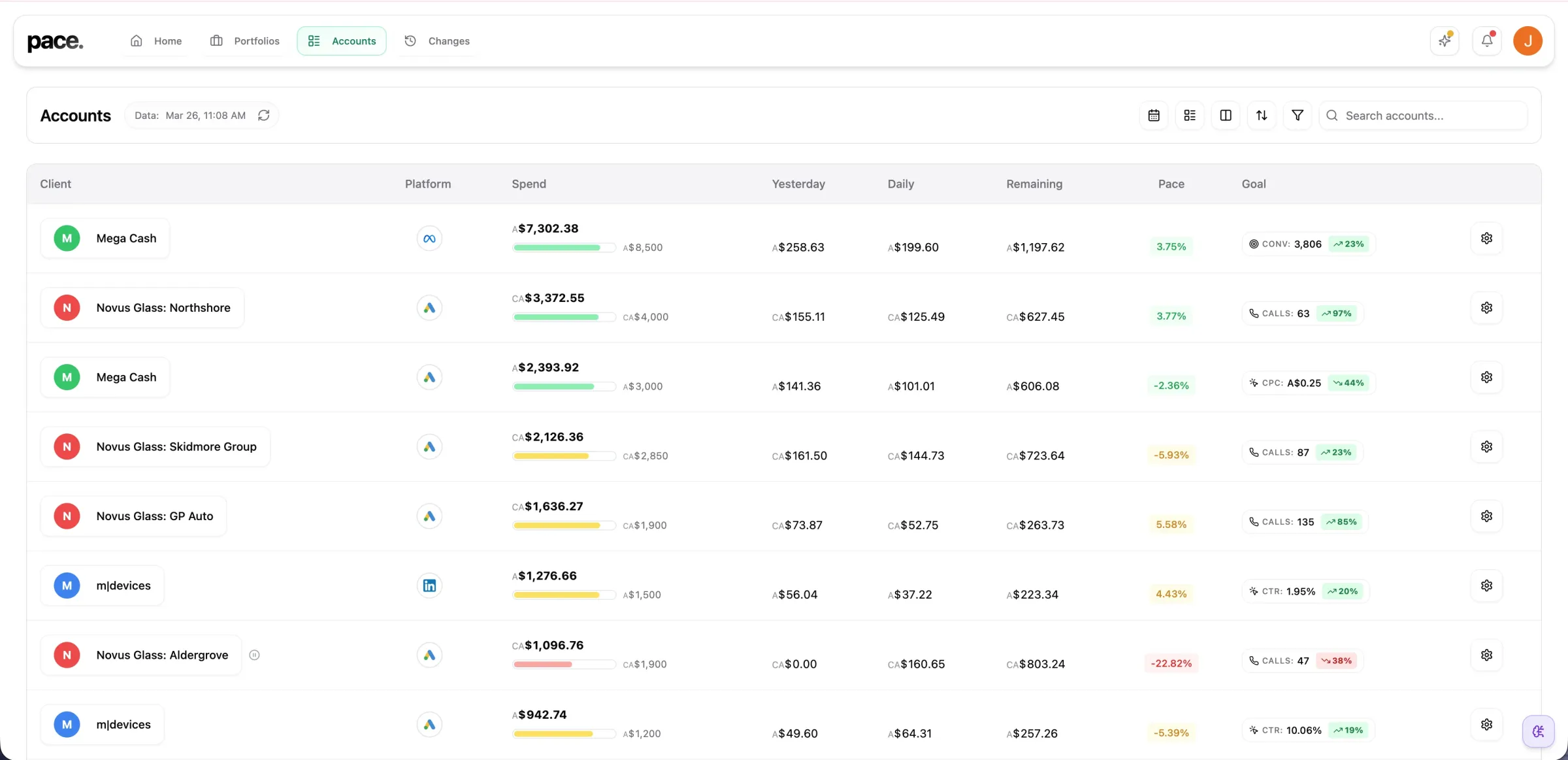
Every client. Every platform. One screen.
The dashboard shows spend, pacing status, and goal performance for every account you manage, in a grid or a sortable table. Pacing variance is color coded, so the one account drifting off target stands out from the nineteen that are fine. Google and Microsoft MCC hierarchies are discovered automatically, nested sub-MCCs included, which matters once your roster runs into dozens of accounts. If most of yours sit on Google, our guide to managing multiple Google Ads accounts covers the structural side too.
AI Budget Pacing
Budget pacing is client insurance
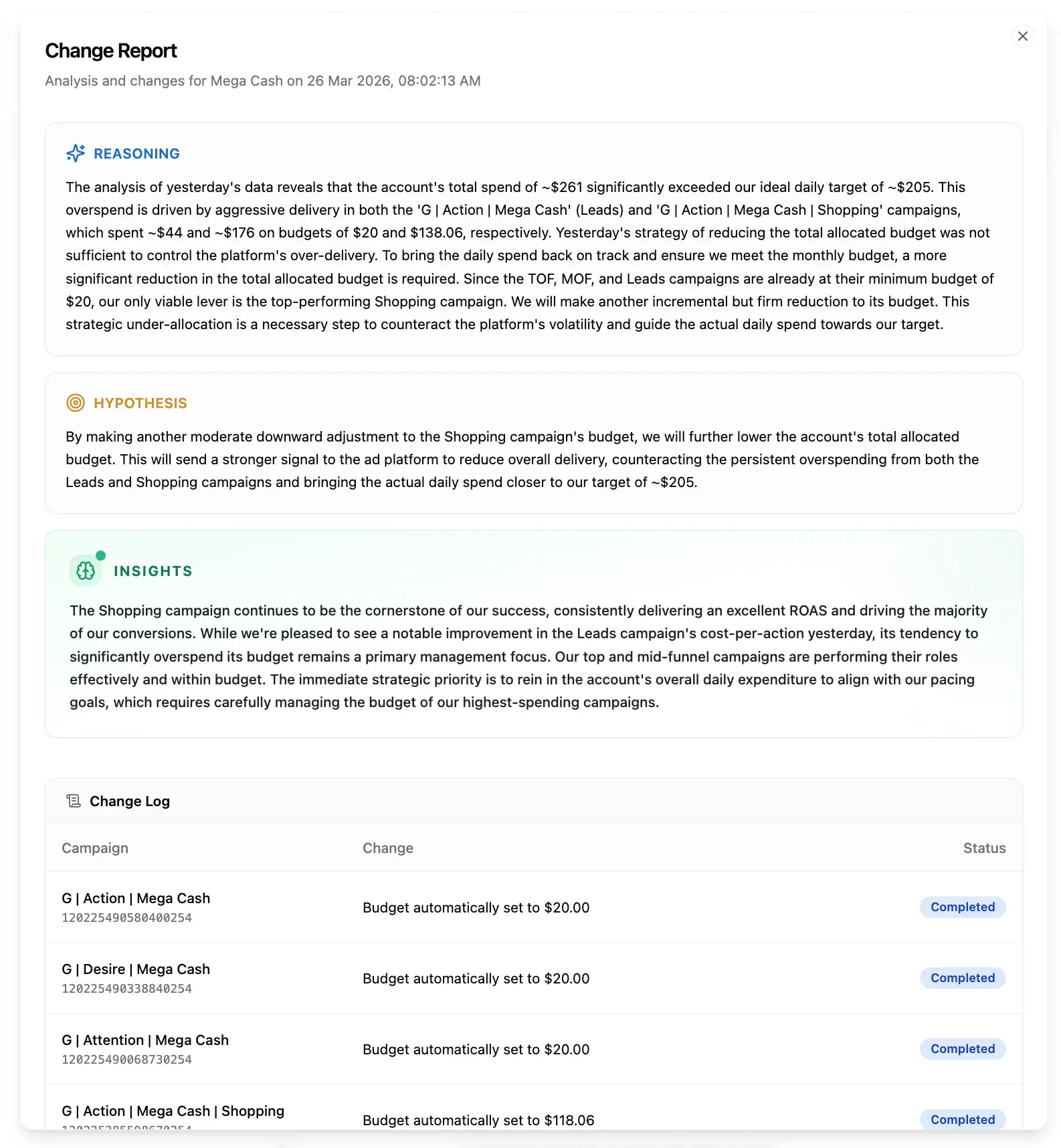
Blow through a client's monthly budget and the conversation stops being about performance. Do it twice and you are probably losing the account. Pace's AI analyzes 45 days of trend data per account and adjusts daily budgets up to three times a day on the One plan, landing spend on the monthly target while moving budgets gradually, with hard day-over-day limits so nothing lurches. Every adjustment is logged with its reasoning. We compared the main options in our roundup of budget pacing tools for ad agencies. If you want the fundamentals first, read our guide to budget pacing.
Overspend Protection
A hard stop before the apology email
Pacing keeps budgets on target. Guardrails catch the genuine blowout. Each client's monthly budget is the cap, and Pace checks spend against it every 5 minutes, independent of the optimization engine. When an account reaches its budget, Pace drops each campaign to $1 a day by default, so campaigns stay live and keep learning, or pauses them if you prefer. On the 1st of the month Pace restores only what it changed itself; anything your team paused manually stays paused.
Client Reports & Change Logs · Pro and above
Reports that show the work, not just the numbers
Build branded 16:10 PDF reports with your agency logo, the client's logo, and AI-drafted commentary written from the actual numbers, then edited in your voice. The Account Changes page pulls straight from Pace's audit log, so every budget change, keyword exclusion, and status update made during the period appears in the report with its reasoning attached. No manual time tracking. Our PPC client reporting guide for agencies walks through what to include and why, and we also reviewed the best PPC reporting tools for agencies if you want to compare.
Portfolios
Every client, rolled up
Group accounts by client, vertical or region and see blended spend, pacing and goals in one view. Portfolio-level Findings catch the problem before the client does. This is the real app below, not a screenshot — click around.
Swipe to explore →
Dot
The account manager who never clocks off
Dot is a senior analyst inside Pace that reads the live data for every client you run. Ask about any account in plain English before a client call and get the numbers, the comparison and what they mean for the strategy — in seconds, at any hour.
- ✓ On call whenever you are — 6am before a review, 11pm before a client call. Cmd+I from any page, and it already knows the account you're looking at.
- ✓ Does the digging itself — more than 20 specialised tools: week-on-week comparisons, campaign and keyword drill-downs, creative fatigue, search-term waste.
- ✓ Shows its working — every answer opens up into the steps it took and the figures behind them, so you're making the call on evidence rather than taking its word for it.
Dot ships on the One and Enterprise plans. Compare plans →
Everything else you need
Beyond the core, Pace is packed with features built specifically for agency workflows.
📑
Client Reports
Branded 16:10 PDFs with executive and portfolio templates, AI-written commentary, and one-click export. Combine every connected platform into one report.
📩
Weekly Reports
Automated weekly summaries via email and Slack with goal-aware formatting and trend indicators.
🎨
Creative Lens
Resonance and fatigue scores on Meta and LinkedIn, asset-level quality on Google. Spot stale creative and weak headlines early, so you know what to brief in next across the whole book.
📏
Account-Wide Spend Scope
Pace sizes against the platform's authoritative MTD spend, catching ABO ad sets, manually-paced campaigns, and archived campaigns that still drain the same budget.
👥
Team Roles
Owner, Admin, and Member roles with appropriate access levels. Invite your team by email.
🔍
Search Lens
Analyze search terms, detect wasteful n-gram patterns, and add negative keywords with one click.
🔔
Slack Integration
Route alerts to specific channels per client. Pacing updates, anomalies, and weekly reports delivered straight to Slack.
✨
Findings
Automated anomaly detection that fires only when something significant happens. No alert fatigue. For wasted search terms and losing ads on Google and Meta, a finding comes with the fix ready; you approve it.
📅
Budget Scheduling
Set different monthly budgets in advance with a visual timeline. Higher in December, lower in January.
🏆
Performance Records
Track all-time bests across every account. Get notified when records break.
💬
Dot
AI chat assistant that can investigate your ad data in real time. Ask questions in plain language.
📝
Change Audit Trail
Every budget change, status update, and keyword exclusion logged with the reasoning behind it. Filter by client, platform, or team member.

Why Pace Exists
Built by someone who ran the agency
Pace founder Jordan Parrello is an agency owner and performance marketer who has managed millions in global ad spend. The pacing spreadsheets, the month-end overspend scares, the late nights assembling reports: Pace exists because he lived all of it and got tired of solving it with headcount.
That is why the product is opinionated about agency problems. Budgets land on target. Every change is logged. Reports build themselves from real data. Read the full story.
Frequently asked questions
Start with platform coverage: it has to connect to everywhere you buy media. From there, the features that matter day to day are automated budget pacing, hard overspend limits, a change log that records what was changed and why, and client-ready reporting. Pace connects to Google, Meta, LinkedIn, Microsoft, TikTok, Reddit, X Ads, and Amazon Ads and was built around exactly those jobs.
Automate the daily layer. Pace adjusts daily budgets up to three times per day against each client's monthly target, checks spend every 5 minutes for overspend, and only alerts you when something significant happens. That removes the manual pacing checks that eat most of a small team's week, so headcount stops being the bottleneck on how many accounts you can run well.
Yes. Pace connects to both LinkedIn Ads and Google Ads through secure OAuth, alongside Meta, Microsoft, TikTok, Reddit, X Ads, and Amazon Ads. Budget pacing and reporting work across all of them from one dashboard, with alerts on top (alert coverage varies by platform), and portfolio reports combine platforms into a single branded PDF for the client.
It depends on your stack, but pacing is the job Pace was built around. The AI analyzes 45 days of trend data per account, adjusts daily budgets to hit the monthly target, moves budgets gradually, with hard day-over-day limits so nothing lurches,, and logs every move with its reasoning. A separate guardrail system checks spend every 5 minutes as a hard backstop.
Whole-roster visibility without clicking into each account. Pace shows spend, pacing status, and goal performance for every client in one grid or sortable table, with color-coded pacing variance so the account drifting off target is obvious at a glance. Grid and table views, blended cross-account charts, and per-account drill-down all come standard.
No — it’s closer to giving each of them a second pair of hands. Pace absorbs the maintenance layer: daily pacing checks, budget adjustments, overspend watching, change documentation, and the first draft of every report. Your team keeps the strategy, the creative judgement, and the client relationships. The practical effect is capacity — one account manager can comfortably carry roughly twice the accounts, so growth stops forcing a hire every six to eight new clients.
Also built for