What is PPC monitoring?
PPC monitoring is the continuous tracking of campaign health metrics across your ad accounts in near real time. It's a different job to auditing or reporting, even though it complements both. An audit is a one-off structured review that checks whether campaigns are configured correctly. Reporting summarises what already happened. Monitoring sits between the two. It watches what is happening right now and alerts you when something breaks.
The point of PPC monitoring is catching anomalies early. A CPA spike that goes unnoticed for two weeks can chew through thousands in wasted spend before anyone opens a dashboard. Conversion tracking that silently breaks on a Friday evening costs you an entire weekend of optimisation data. A single campaign overspending can drain a client's monthly allocation before mid-month. Impression share dropping 20% usually means a competitor has stepped on the auction or your quality scores have slipped.
For agencies running ten or more accounts across multiple platforms, monitoring manually isn't difficult. It's impossible. A media buyer checking Google Ads, Meta, LinkedIn and Microsoft Ads for every client each morning would spend their whole day inside platform UIs before making a single optimisation. Paid search monitoring tools exist to clear that bottleneck. They watch every account continuously and surface only the issues that need a human. Monitoring is one layer of the job; our guide to paid search management tools and strategy covers the rest of the stack.
The agencies that adopt continuous monitoring tell me the same two things: faster response times to problems, and fewer awkward client conversations. Both translate into better retention and better performance.
What to monitor in your PPC campaigns
Knowing what to watch matters as much as having the tools to watch it. Not every metric needs a real-time alert. Monitor too many signals and the noise gets ignored. Here are seven areas worth keeping eyes on.
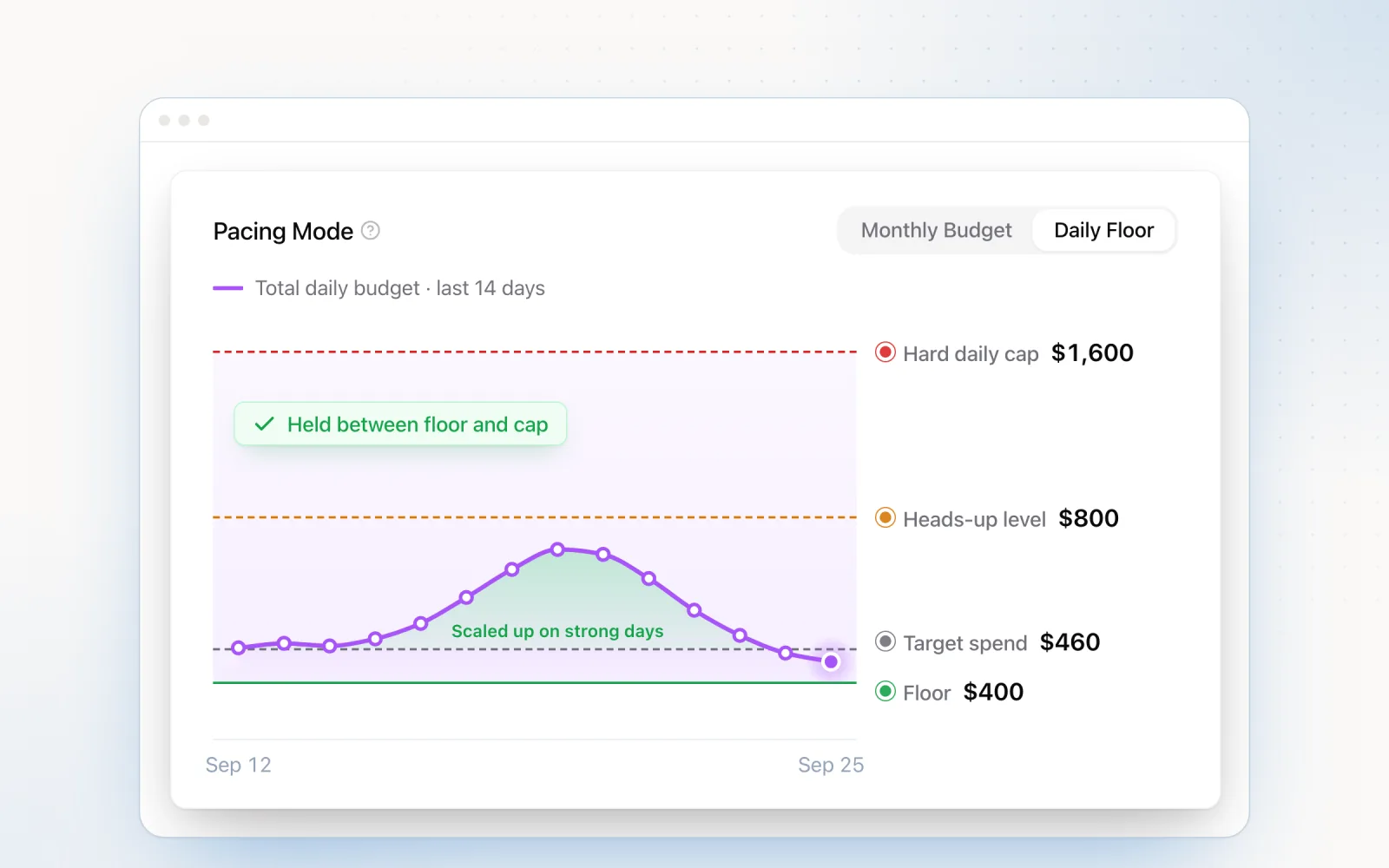
Budget pacing. Track actual spend against your target daily rate. A campaign pacing 30% ahead by the 10th will overshoot its monthly budget unless someone intervenes. A campaign pacing 40% behind is leaving conversions on the table. This is the metric where early detection has the most direct financial impact. For a deeper look at pacing tools and strategies, see our budget pacing tools comparison.
CPA and ROAS trends. Watch the 7-day rolling average against the client's target. Single-day fluctuations are normal because platform algorithms have natural variance. But when the rolling average drifts more than 20% above target for three days running, that's a real trend, not noise, and it warrants deeper paid search analysis. ROAS works the same way in reverse. A sustained drop below threshold usually means creative fatigue, audience saturation or competitive pressure.
Conversion tracking health. A sudden drop to zero conversions is almost never a performance problem. It's a tracking failure. A Google Tag that stops firing after a site update. A Meta pixel that loses domain verification. A LinkedIn Insight Tag that gets removed during a CMS migration. A "zero conversions in 48 hours" alert catches these before they corrupt your bidding algorithms and historical data.
Impression share. Search impression share tells you how much of the available auction inventory you're winning. Watch both "search lost IS (budget)" and "search lost IS (rank)" because they diagnose different problems. Lost share to budget means you need more daily spend. Lost share to rank means your quality scores or bids are slipping behind competitors. Either way, a week-over-week drop above 15% is worth a look.
Quality score changes. Quality score doesn't change often, which makes bulk drops especially loud. If ten keywords in the same ad group drop from 7 to 5 at the same time, the cause is almost always a landing page change or a relevance shift, not gradual competitive pressure. A weekly check across your highest-spend keywords catches these before the CPC increases start eating margin.
Search term drift. New search terms keep entering your campaigns through broad and phrase match. Without monitoring, irrelevant queries can chew through real budget before anyone opens the search terms report. Set a weekly check to flag search terms that triggered spend above a threshold (say $20) without converting. This is where negative keyword management meets monitoring. The two work together.
Competitor activity. Auction insights tell you when a competitor gets aggressive. A jump in their overlap rate or position-above rate on your brand campaigns means they've started bidding on your terms, or pushed their bids up. Check auction insights weekly (Google updates the data on a short delay). It gives you enough warning to adjust your defensive bids. For a fuller methodology, see our guide on measuring share of voice in PPC.
The best PPC monitoring tools
Monitoring tools span purpose-built platforms, native platform features and custom-coded scripts. Here are six options, each suited to a different use case and level of technical maturity.
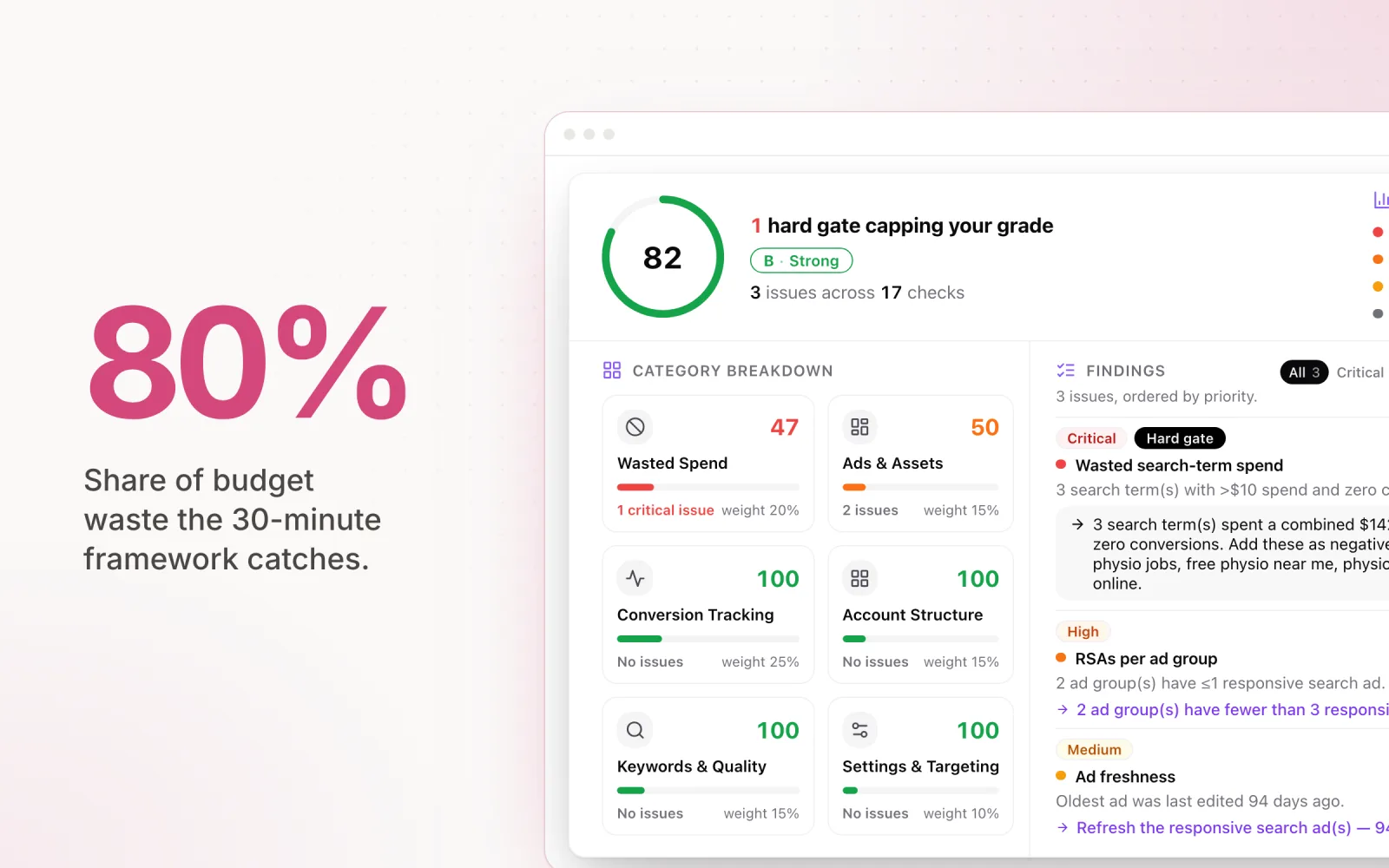
Pace Ads. Pace runs cross-platform monitoring across Google, Meta, TikTok, LinkedIn, Microsoft, Reddit, X Ads and Amazon Ads from one dashboard. Its Findings flag anomalies automatically (CPA spikes above 30%, conversion drops, creative fatigue, pacing deviations) and pushes alerts to Slack or email with context on what changed and why it matters. Unlike rule-based tools where you set every threshold by hand, Pace learns each account's normal patterns and flags deviations from those baselines. Best for agencies that want continuous cross-platform coverage without spending hours configuring rules for every account.
Optmyzr. Optmyzr does rule-based monitoring and alerting for Google and Microsoft Ads. You define conditions (e.g. "alert me when CPA exceeds $50 on any campaign spending above $100/day") and Optmyzr checks them on a schedule, notifying you when thresholds are breached. The strength is deep customisation. Experienced PPC managers can encode their exact monitoring logic into the rule engine. The limitation is that every scenario needs a hand-built rule, and cross-platform coverage stops at Google and Microsoft.
Adalysis. Adalysis focuses on Google Ads, with particular strength in quality score tracking and ad testing alerts. It watches quality score changes at the keyword level and flags statistically significant declines. Its ad testing engine tracks variant performance and tells you when a clear winner or loser has emerged, so underperforming ads don't keep running. Best for agencies running mostly Google Ads accounts that want specialist monitoring for quality scores and ad copy.
PPC Protect and ClickCease. These sit in a different niche: click fraud detection. They analyse click patterns in real time and identify invalid clicks from bots, competitors and click farms. When suspicious activity shows up, they can auto-add IP exclusions. For high-CPC industries like legal, insurance and home services, where a single click can cost $50 to $200, click fraud monitoring isn't optional. It's defence against budget waste that has nothing to do with strategy.
Google Ads automated rules. Google's built-in rules are free and need no third-party integration. You can configure email notifications for specific conditions, like "email me when any campaign spends more than $500 in a day" or "email me when any campaign's 7-day average CPA exceeds $80." The interface is straightforward, and for agencies starting out with monitoring, automated rules are a fine first step. The limitation: Google Ads only. No visibility into Meta, LinkedIn or Microsoft.
Custom Google Ads scripts. For teams with JavaScript capability, scripts are the most flexible option. They can query any metric in the Google Ads API, apply custom logic and send alerts via email or push data into external systems. Common scripts include hourly spend alerts, quality score change logs, broken URL detection and search term anomaly flagging. The power is in customisation. You can watch anything the API exposes, in any combination. The cost is maintenance. Scripts break when Google changes the API, they need someone who can debug JavaScript, and they only cover Google Ads.
Brand monitoring in PPC
Competitors bidding on your brand terms is one of the most common (and most frequently missed) problems in paid search. Without active monitoring, a competitor can run ads on your brand name for months before anyone notices, quietly siphoning clicks from people who were specifically searching for you.
The primary detection method is the auction insights report in Google Ads. For your brand campaigns, check the overlap rate and position-above rate for each competitor domain. An overlap rate of 40% means that competitor shows up in the same auctions as you 40% of the time. A position-above rate of 25% means they appear above you in a quarter of those shared auctions. Both numbers trending upward means a competitor is actively targeting your brand terms.
Third-party brand monitoring tools fill in what auction insights doesn't show. Some watch the actual ad copy competitors are running on your brand terms. That matters because ad copy that includes your trademarked brand name in the headline may breach Google's trademark policy, and it can be reported.
When you spot competitor brand bidding, treat the response like a checklist. First, document the presence: screenshot their ads, note the dates, save the auction insights data. Second, review your own brand campaign bids and make sure they're high enough to hold top-of-page position. Brand campaigns should target 90% or higher absolute top impression share. Third, if the competitor's ad copy actually uses your brand name in the ad text (not just as a keyword trigger), file a trademark complaint with Google. Google won't stop them bidding on your brand keywords, but it will restrict them from using your trademarked name in their ad copy if your complaint is valid.
Brand bid monitoring should happen weekly at minimum. For brands in SaaS, financial services or legal, daily monitoring is fair. The cost of lost brand clicks adds up fast.
Setting up PPC alerts and notifications
Monitoring without notifications is just data collection. Monitoring tools only earn their cost when the right people get the right alerts at the right time. Here's how to set up alerts that catch problems without creating alert fatigue.
Google Ads automated rules. Go to Tools > Bulk Actions > Rules. Create a new rule, choose the entity level (campaign, ad group or keyword), define the condition, set the action to "Email," and set the frequency. For spend monitoring, trigger when any campaign's daily spend goes above 120% of its average daily budget. For conversion monitoring, trigger when conversions equal zero on any active campaign over the past 48 hours. Google runs these checks on the schedule you pick. Daily is the most common.
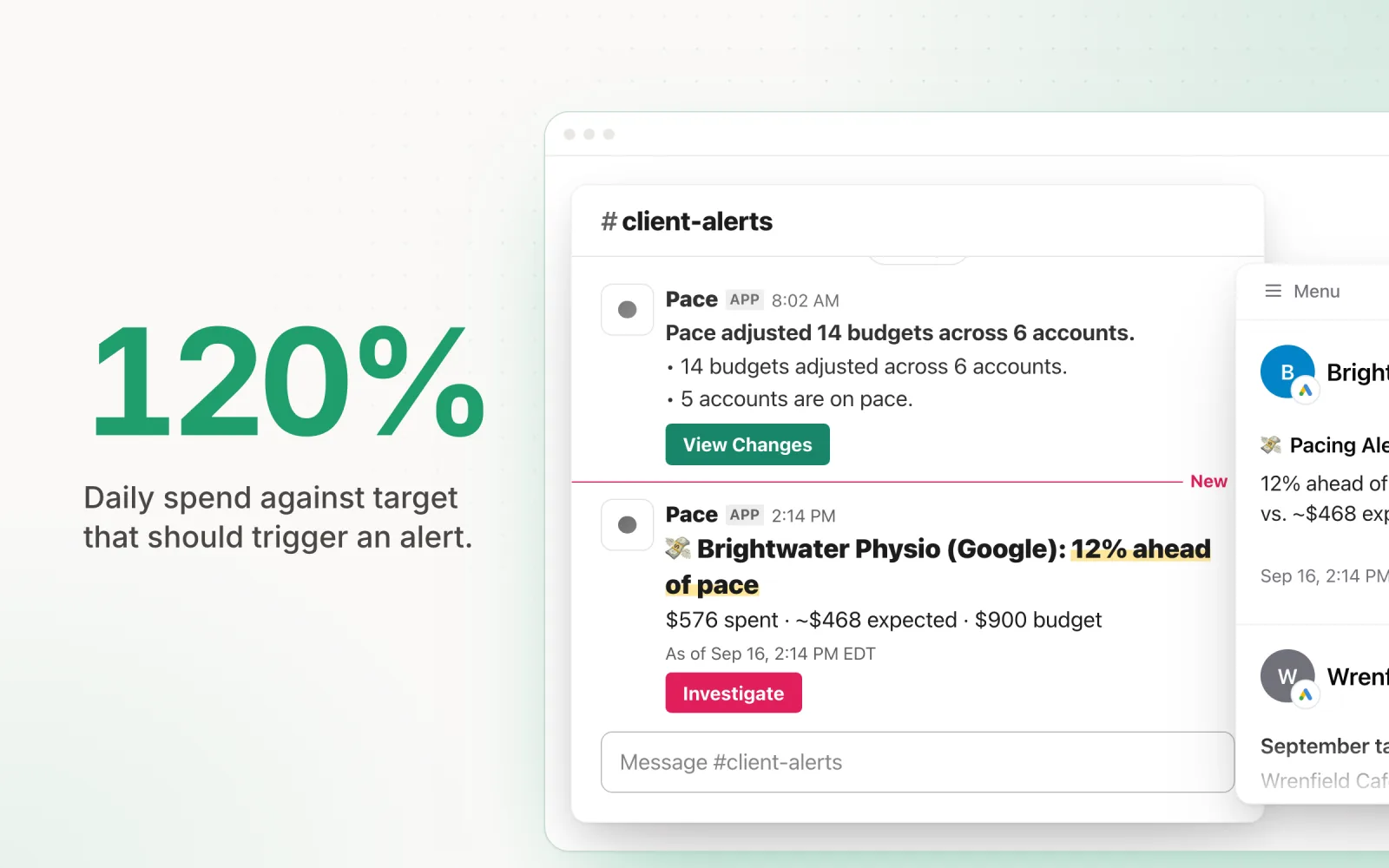
Third-party Slack and email integrations. Tools like Pace and Optmyzr ship native integrations with Slack, Microsoft Teams and email. The advantage over Google's built-in rules is cross-platform coverage and richer alert context. A Pace alert doesn't just say "CPA exceeded threshold." It tells you which campaigns are affected, how big the deviation is, what the 7-day trend looks like, and what probably caused the change. That cuts the time between receiving an alert and knowing what to do.
What thresholds to set. Start with five high-signal alerts: daily spend above 120% of your target daily rate, CPA above 130% of the client's target, zero conversions on any active campaign over a 48-hour window, impression share dropping more than 15% week-over-week, and any campaign running out of budget before 3pm in its target time zone. These cover the most common and most expensive problems without generating excessive noise.
The single most important rule for alert configuration: start with fewer, high-signal alerts and add more gradually. Too many alerts make noise. Noise gets ignored. When every alert demands attention, no alert gets it. An agency receiving three alerts per day and investigating all of them is better off than one receiving thirty alerts and ignoring most. Calibrate your thresholds so each alert represents a genuine issue worth acting on, not normal fluctuation that resolves itself.
From periodic audits to continuous monitoring
The path most agencies take with PPC management is predictable. They start with manual monthly audits, a spreadsheet review of each account's performance, usually triggered by a client report deadline. It catches problems, but only after they've been running for weeks. A conversion tracking failure on the 3rd of the month doesn't get found until the 28th, when someone pulls the monthly report.
Next stop is automated weekly alerts. Google Ads automated rules or basic third-party integrations check key metrics on a schedule and email the team when something breaches a threshold. This shrinks the detection window from weeks to days. A spend anomaly on Tuesday gets investigated on Wednesday instead of sitting until month-end.
The final stage is continuous real-time monitoring. Tools that connect to your ad platforms via API and check performance throughout the day shrink the detection window to hours. A CPA spike at 10am triggers an alert by noon. A conversion tracking failure after a Friday deployment gets flagged before the weekend even starts.
Each step catches problems earlier and reduces wasted spend. The maths is simple. If a broken conversion tag wastes $200 a day in misallocated budget, catching it in 4 hours instead of 14 days saves $2,600. Multiply that across 20 client accounts and the annual savings from continuous monitoring dwarf the cost of any monitoring tool.
If you're still doing manual audits, our PPC audit guide is a good starting point. It gives you structure for the reviews you're already running. Once you're past 10 accounts, automated alerts are the minimum. Once you're past 20 accounts across multiple platforms, continuous monitoring stops being a nice-to-have. For a broader view of what to automate, read our guide on PPC automation in 2026. Monitoring sits squarely in the "automate this" tier of that three-layer model.
Pace automates monitoring across Google, Meta, TikTok, LinkedIn, Microsoft, Reddit, X Ads and Amazon Ads from one platform, surfacing the anomalies that matter so you act on problems instead of hunting for them. Start a free trial.

Jordan Parrello
Founder of Pace. Ran an agency pacing sheet by hand for years before building the thing that checks it every 5 minutes. About Pace or LinkedIn